GitHub Actions で実行している Storybook Test の速度を改善する
環境情報
- pnpm / node
- Next.js 14.0.4
- Storybook
- Playwright
コンポーネントのテストコードは基本的に各Storyファイルに記述をし、Storybook経由でテストを行う構成にしています。
尚、テストの実行にPlaywrightを利用しています。
修正前のコード
name: 'Storybook Tests'
on:  pull_request:    branches:      - develop      - master
jobs:  test:    timeout-minutes: 60    runs-on: ubuntu-latest    steps:      - uses: actions/checkout@v4.1.1      - name: Use Node.js        uses: actions/setup-node@v4        with:          node-version-file: '.node-version'      - name: Install pnpm        run: |          npm install -g pnpm      - name: Install dependencies        run: pnpm install --frozen-lockfile      - name: Install Playwright        run: pnpm exec playwright install --with-deps      - name: Build Storybook        run: pnpm build:storybook --quiet      - name: Serve Storybook and run tests        run: |          pnpm exec concurrently -k -s first -n "SB,TEST" -c "magenta,blue" \            "pnpm exec http-server storybook-static --port 6006 --silent" \            "pnpm exec wait-on tcp:6006 && pnpm test:storybook"
とりあえず動けばいいか、という気持ちで書いたものなので、
- npm経由で毎回pnpmをインストールしている
- キャッシュの設定をしていない
等の問題があります。
修正前の実行時間
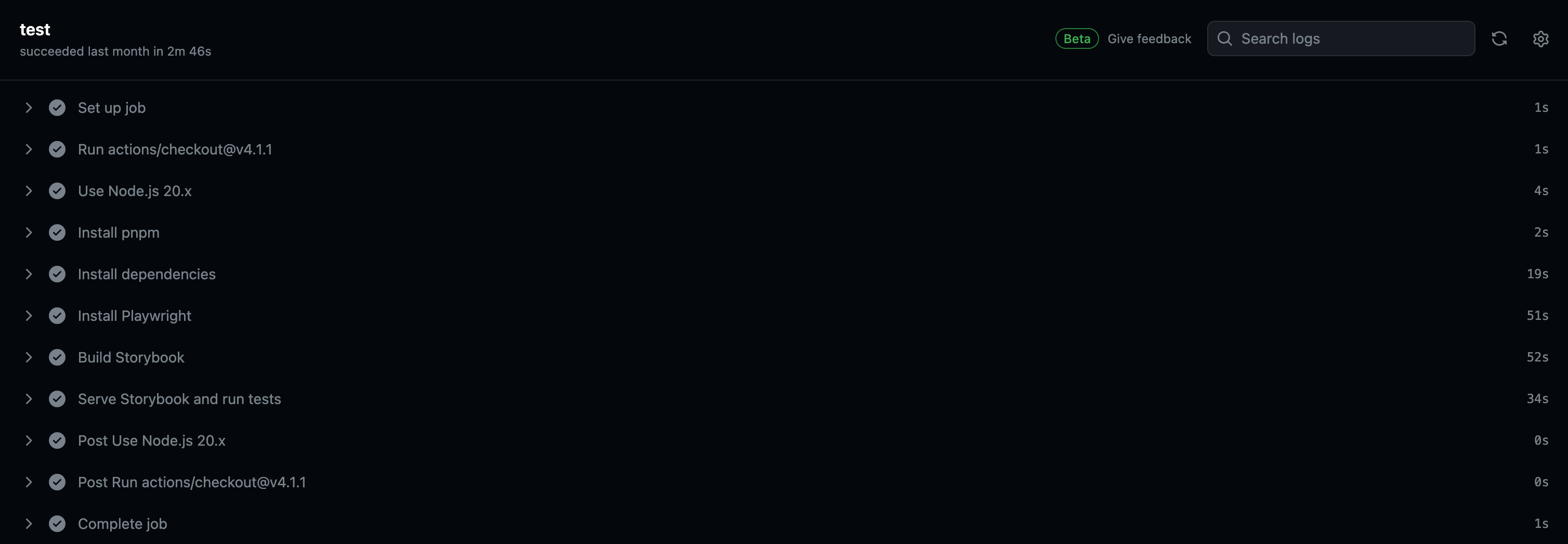
2分46秒かかっています。
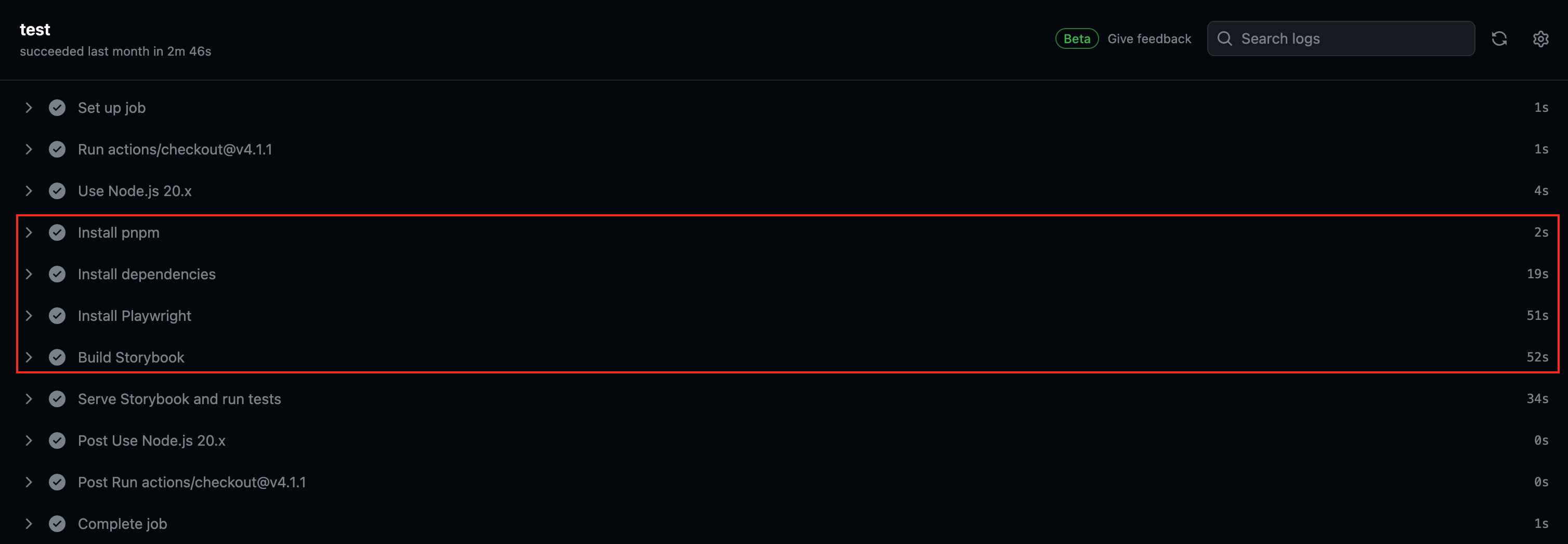
赤枠の
- pnpmのインストール(直接グローバルインストールをしている)
- 依存関係のインストール
- Playwrightのインストール
- Storybookのビルド
を修正します。
修正後のコード
name: 'Storybook Tests'
on:  pull_request:    branches:      - develop      - master
jobs:  test:    timeout-minutes: 60    runs-on: ubuntu-latest    steps:      - uses: actions/checkout@v4.1.1      - uses: pnpm/action-setup@v3        with:          version: 8      - name: Use Node.js        uses: actions/setup-node@v4        with:          node-version-file: '.node-version'          cache: 'pnpm'      - name: Install dependencies        run: pnpm install --frozen-lockfile      - name: Setup Playwright cache        id: playwright-cache        uses: actions/cache@v4        with:          path: /home/runner/.cache          key: ${{ runner.os }}-playwright-cache-${{ hashFiles('**/.storybook/test-runner.ts') }}          restore-keys: ${{ runner.os }}-playwright-cache-      - name: Install Playwright        if: steps.playwright-cache.outputs.cache-hit != 'true'        run: pnpm exec playwright install --with-deps      - name: Build Storybook        run: pnpm build:storybook --quiet      - name: Serve Storybook and run tests        run: |          pnpm exec concurrently -k -s first -n "SB,TEST" -c "magenta,blue" \            "pnpm exec http-server storybook-static --port 6006 --silent" \            "pnpm exec wait-on tcp:6006 && pnpm test:storybook"
修正後の実行時間
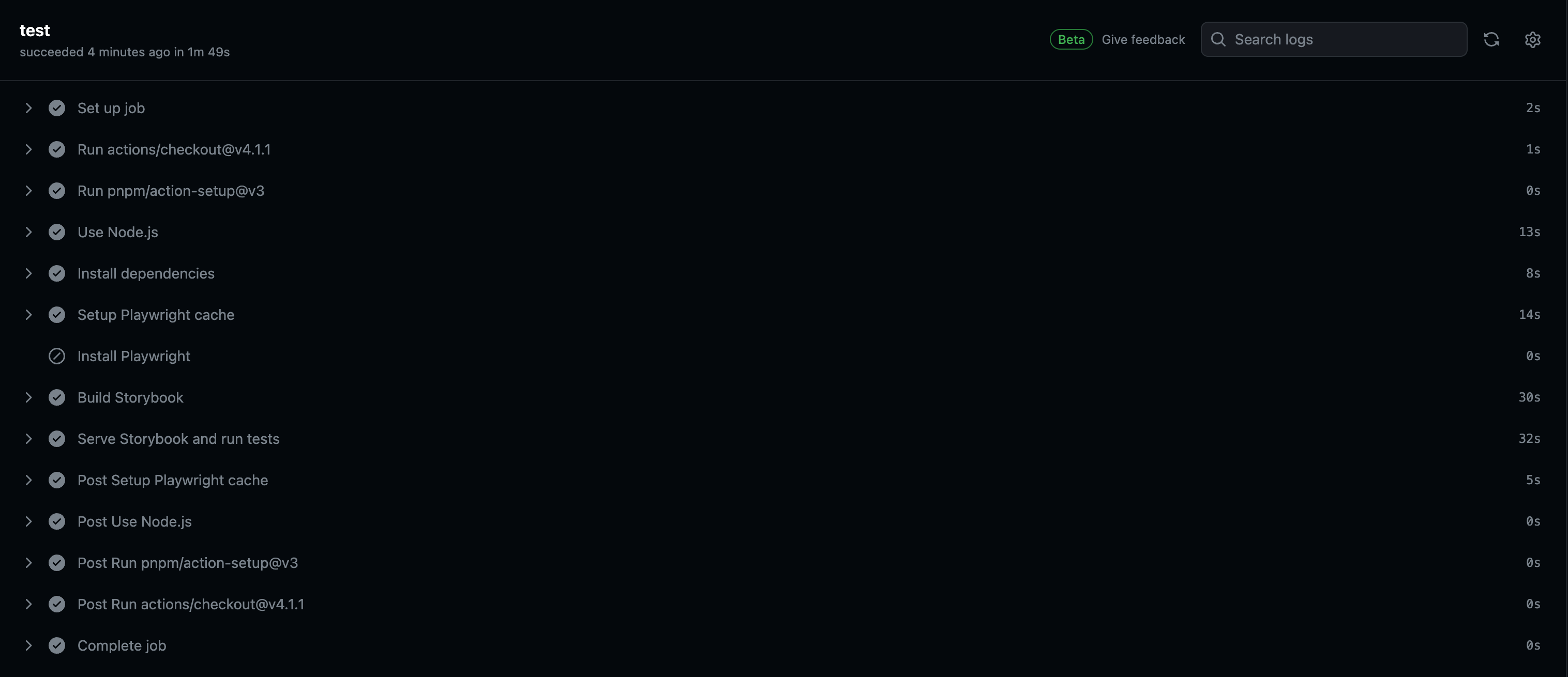
キャッシュがある状態だと1分49秒なので、約1分速くなりました!
具体的な修正内容については次の節で解説します。
修正内容
pnpm を pnpm/action-setup での利用にする
修正前はnpmから直接pnpmをインストールしていしたが、
- name: Use Node.js uses: actions/setup-node@v4 with: node-version-file: '.node-version' - name: Install pnpm run: | npm install -g pnpm下記のようにpnpm/action-setupでの利用に変更しました。
また、合わせてキャッシュの設定もしています。
- uses: pnpm/action-setup@v3 with: version: 8 - name: Use Node.js uses: actions/setup-node@v4 with: node-version-file: '.node-version' cache: 'pnpm'参考: https://pnpm.io/ja/continuous-integration#github-actions
Playwright にキャッシュの設定を行う
修正前は普通にインストールする形でしたが、
- name: Install Playwright run: pnpm exec playwright install --with-depsキャッシュの設定と、キャッシュ有無に応じてインストールをスキップするよう修正しました。
尚、キャッシュのキー指定について、package.jsonやロックファイルを指定するのがシンプルですが、
今回、PlaywrightはStorybookのテストでしか使っていない・極力インストールを省略したかったため、Storybookのテスト設定をしている/.storybook/test-runner.tsをキーとしました。
- name: Setup Playwright cache id: playwright-cache uses: actions/cache@v4 with: path: /home/runner/.cache key: ${{ runner.os }}-playwright-cache-${{ hashFiles('**/.storybook/test-runner.ts') }} restore-keys: ${{ runner.os }}-playwright-cache- - name: Install Playwright if: steps.playwright-cache.outputs.cache-hit != 'true' run: pnpm exec playwright install --with-deps下記の記事を参考にさせていただきました。
Storybook の Builder を SWCに変更する
調べていたところ、StorybookをSWCにするとビルドが速くなるという情報を得たので変更してみました。
参考: https://qiita.com/KokiSakano/items/4f867a240886274fb849
参考の通りにオプションを変更したところ、
framework: { name: '@storybook/nextjs', options: { builder: { useSWC: true } }, },変更前(18秒)

変更後(9.47秒)

ローカルでのビルド時間が約半分になりました!
もちろん、CI上でも速くなっています。
まとめ
コードが増えるにつれて、実行時間も徐々に長くなっていたので、微量ですが速くなって良かったです。
また、はじめのうちにしっかりと考慮して書いておくべきだったなという反省もあります。
まだまだ改善できる点があると思うので、色々試してまた記事にできたらと思います。
最後までお読みいただきありがとうございました!